
Nevquo Pixel › HEIC to JPG
iPhones save photos as HEIC by default. They are small, but many Windows programs, websites and printers still do not accept them. This page turns them into ordinary JPG files on your own device, so your photos are never sent to anyone.
How to convert HEIC to JPG
- Add your HEIC photos. Drop them on the page, or choose a whole folder if you copied the photos off your phone.
- Wait for the conversion. The HEIC reader is downloaded the first time you use it, then each photo is converted on your device.
- Download the JPGs. Download one by one or as a ZIP. File names stay the same, only the ending changes to
.jpg.
Why not upload to an online converter?
Phone photos often show your home, your family and sometimes your exact location. Many converters work by uploading every photo to a server, which means a copy of it leaves your control. This page does the conversion in your browser. You can check this yourself by opening the Network tab in your browser tools while you convert; you will see no image upload.
What you get in the JPG
The default setting is Nearly identical, which aims for a JPG that looks the same as the HEIC at normal size and when zoomed. The JPG will usually be bigger than the HEIC, because HEIC is a more efficient format. That is normal. If size matters more than the last bit of detail, choose Smaller files, or use Compress to a size in KB afterwards.
The converted JPG carries no EXIF block. Location, camera model and the date taken are not copied into it, which is also handy when you want to share a photo privately. If you need the date, check it before you convert, or keep the HEIC original.
If you would rather stop getting HEIC
On an iPhone you can switch the camera to save JPEG instead: open Settings, then Camera, then Formats, and choose Most Compatible. New photos will be JPEG and need no conversion, at the price of larger files. Photos you already took stay as HEIC, so this page is for those.
A real before and after
We converted a photograph saved as HEIC (made from a public-domain photo, at quality 85) to JPG with the default settings of this page. Most browsers cannot display HEIC, so only the JPG result is shown below.
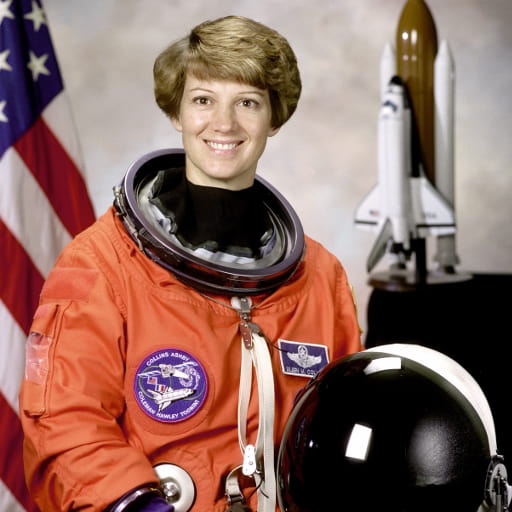
| File | Before | After | Saved | Visual score |
|---|---|---|---|---|
| astronaut.heic | 140 KB HEIC | 43 KB JPEG | −69% | 99.3 |
Test images: astronaut: NASA portrait of Eileen Collins (public domain). The photos come from the public-domain and CC0 images bundled with scikit-image, at their original size. The HEIC file was created from it for this test. Measured with the Nevquo Pixel engine, version 1.2.0, on 2026-10-10. Check it yourself: astronaut.heic (original). Results (astronaut.jpg).

Frequently asked questions
Why is the JPG bigger than the HEIC?
HEIC compresses more efficiently than JPEG, so the same picture takes more bytes as JPG. Choose Smaller files if you want to trade a little detail for size.
Does the JPG keep the photo date and GPS?
No. The converted JPG has no EXIF data, so location, camera and date taken are not copied. Keep the HEIC original if you need them.
Is there a limit on how many HEIC photos I can convert?
No limit on the count. Each file can be up to 300 MB, and conversion speed depends on your device.
Do my photos get uploaded?
No. The HEIC reader runs in your browser and nothing leaves your device.
Can I convert HEIC on a phone?
Yes, it works in the browser on phones and tablets too, though very large batches are faster on a computer.